 RegClean Pro
A safer, reliable way to look after your Windows Registry.
RegClean Pro finds invalid registry entries and lets you review them before anything changes. It backs up the registry before every repair, so maintenance stays simple and easy to undo.
-
ScanFor issues

-
RepairRegistry

-
Back UpRegistry

-
Safe &Secure

 Purchase Now
Compatible OS: Windows 11/10/8.1/8 and 7 SP1+ (both 32 bit and 64 bit)
End User License Agreement
Purchase Now
Compatible OS: Windows 11/10/8.1/8 and 7 SP1+ (both 32 bit and 64 bit)
End User License Agreement


Registry care built on trust
Know what is detected, choose which entries to remove, and keep a backup ready. Simple tools focused on reliability.

Find invalid references
Scan the parts of the registry you choose for leftovers from programs you've removed, links to files that no longer exist, and other broken entries.

You choose what to fix
See everything it found, uncheck what you want to keep, and fix the rest. Nothing is hidden, and you never have to fix it all at once.

Restore when needed
Restore your backup anytime with a single click. If any program behaves unexpectedly or you face any issue, you can undo changes instantly.
Everything you need to clean and maintain your registry.
Find registry issues, review what needs attention, and choose what you want to fix. Everything is organized in one simple place.
Purchase Now
Compatible OS: Windows 11/10/8.1/8 and 7 SP1+ (both 32 bit and 64 bit)
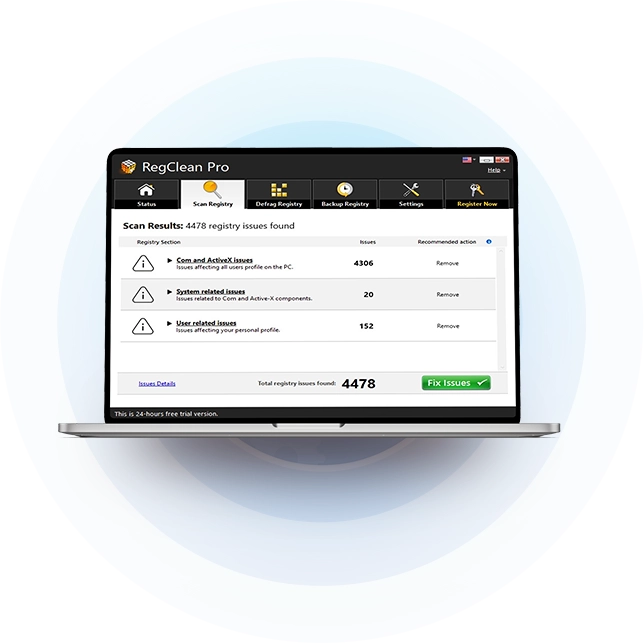
Three steps to clean registry
Scan whenever you want to clean invalid registry entries, or run it on a schedule.
Choose and scan
Select registry items to scan and let the tool flag orphaned keys and broken background pointers.
Review scan results
See categories and individual entries. Exclude anything you do not want the app to repair.
Repair & safeguard
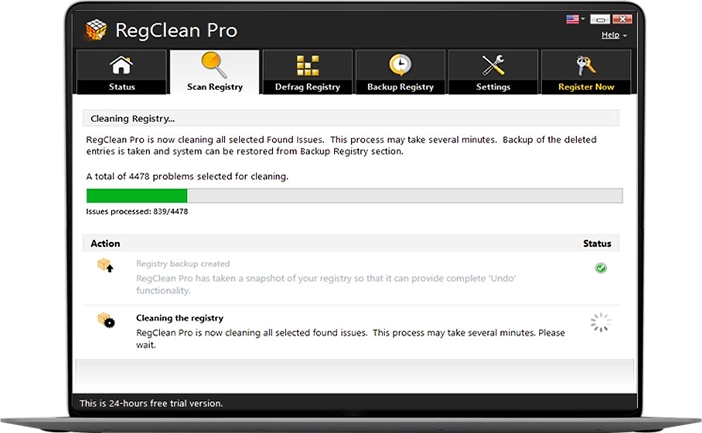
Create automatic full or partial backups, clean flagged issues, and restore saved states anytime.
Built for routine registry care
Simple features to help you scan, clean, back up, and manage your registry.
Selective Scanning
Scan only the registry areas you want to check instead of scanning everything.

Full & Partial Backups
Create a full backup before cleaning and a partial backup before making changes.

Schedule scanning
Set up weekly or monthly scans to check your registry regularly.

Clear Diagnostic Log
See clear summaries of scan results and issues before making changes.
Exclusions
Choose programs or system paths that you want to leave out of future scans.

Restore Registry Backup
Restore a previous backup if you need to undo registry changes.
Every change can be restored anytime.
RegClean Pro creates a full registry backup and takes partial backups before every repair, giving you the freedom to restore earlier setups.
Purchase Now
Compatible OS: Windows 11/10/8.1/8 and 7 SP1+ (both 32 bit and 64 bit)
Uninstall Guidelines |
End User License Agreement
Trial vs Registered: Feature Comparison
Start with the free trial to explore the interface and scan your PC. The registered version unlocks the complete repair and
maintenance feature set.
| RegClean Pro - Features | Trial Version* | Registered Version |
|---|---|---|
Scans Windows RegistryFinds invalid registry entries, missing references and common system issues. |
 |
 |
All-In-One ToolLoaded with essential features to speed up the PC and enjoy stable operations. |
|
|
Backup/Restore Windows RegistryProvides complete backup and restore support, allowing you to return to any previous configuration. |
|
|
Lightweight & EfficientExtremely light on system resources & doesn't consume a lot of system resources. |
|
|
Multilingual SupportCompatible with a variety of languages to suit every user's needs & preferences. |
|
|
Exclusion ListSkip issues that are related to Removable media and prevent empty Registry keys from being listed as issues. |
|
|
Schedule Automatic ScanningConfigure an automatic scanning schedule according to your preferred date, days of the week & time. |
|
|
Regular Product UpdatesReceives regular product updates to enhance overall user-experience. |
 |
|
Defrag The RegistryReorganize fragmented and cluttered Windows Registry in a single click. |
|
|
Resolves Multiple PC IssuesSupports fixing issues related to User Profiles, Active-X components, Startup, Uninstall etc. |
|
|
24/7 Email SupportPriority email technical support |
|
|
|
*You can enjoy all the features in 24 hours fully functional trial version. However, after that, only a few features will work. |
US$ 69.95
US$ 39.95
Buy Now
|
Frequently Asked Questions
Have a question not listed here? Write to us at support@systweak.com and our dedicated support team is available 24/7 to assist you.
It checks Windows registry areas for obsolete entries, missing file paths, and orphan keys left by uninstalled apps, giving you complete control over what gets cleaned.
Yes. You can review scan results, check every flagged category, approve individual items for cleanup, or mark specific paths to be skipped using the exclusion tool.
Absolutely. Full and partial backups are created automatically prior to any modification, allowing you to revert changes with a single click.
Uninstalling software leaves blank spaces inside the registry database. The defrag function collapses those empty gaps to maintain a lean, structured database.
Running a check once every few weeks or right after deleting major desktop software keeps orphan clutter from building up over time.
No. RegClean Pro focuses exclusively on cleaning invalid registry entries and compacting database files. It does not scan for viruses or active security threats.
RegClean Pro supports Windows 7 SP1 and up, including 8, 8.1, 10, and 11, on both 32-bit and 64-bit machines.
No. RegClean Pro only flags invalid registry entries for review, and nothing gets removed until you approve it. A backup is created first, so your system stays protected.